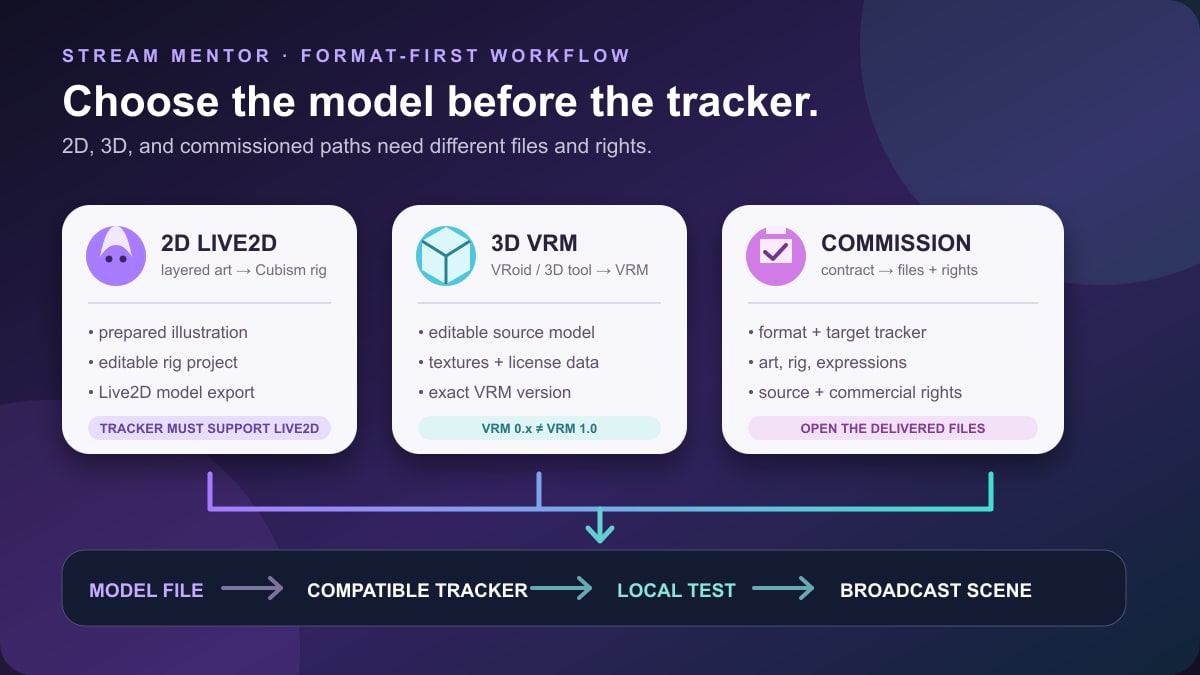
Quick answer: choose the avatar format before choosing a “VTuber avatar creator.” A 2D Live2D model, a 3D VRM model, and a commissioned custom model use different source files, rigging steps, tracking applications, and licenses. VTube Studio does not create or rig avatars and does not support VRM; VRoid Studio creates 3D models and currently exports VRM 1.0; Live2D Cubism turns prepared layered artwork into a 2D model.
Best beginner paths:
- 2D: prepare or commission properly separated artwork, rig it in Live2D Cubism, then load the finished compatible model into a tracker such as VTube Studio.
- 3D: create an anime-style character in VRoid Studio, export VRM 1.0, then choose tracking software that explicitly supports that VRM version.
- Commissioned: choose the target tracker and file format first, then contract the art, modeling, rigging, commercial rights, source files, and revisions in writing.
Editorial update: Stream Mentor completely rebuilt this guide on July 24, 2026 using current Live2D, VRoid, VRM, VTube Studio, and VSeeFace documentation. The previous article confused creation, tracking, storefronts, and streaming; called Steam an avatar creator; promoted an old Wakaru beta; and made unsupported “easy,” “best,” and first-person recommendations. This version does not claim that Stream Mentor commissioned or hands-on tested every workflow.
Avatar creator, rigger, tracker, and broadcaster are different
| Layer | What it does | Examples | What it does not guarantee |
|---|---|---|---|
| Art or character creator | Produces the visible character artwork or 3D geometry | Layered illustration, VRoid Studio, Blender | A stream-ready rig or compatible export |
| Modeling and rigging | Maps artwork or geometry to controllable parameters | Live2D Cubism for 2D; bones and blend shapes for 3D | Accurate face tracking by itself |
| Tracking application | Maps camera or phone data to the model | VTube Studio for Live2D; a compatible VRM tracker for 3D | Creation of missing art, expressions, or rig parameters |
| Broadcast software | Composites the avatar with gameplay, alerts, audio, and video | OBS Studio and similar production tools | Model creation, rigging, or tracking compatibility |
A tool can cover more than one layer, but do not assume it does. A character preview moving on a product page does not prove that the download contains editable art, a rig, commercial rights, or the format your tracker accepts.
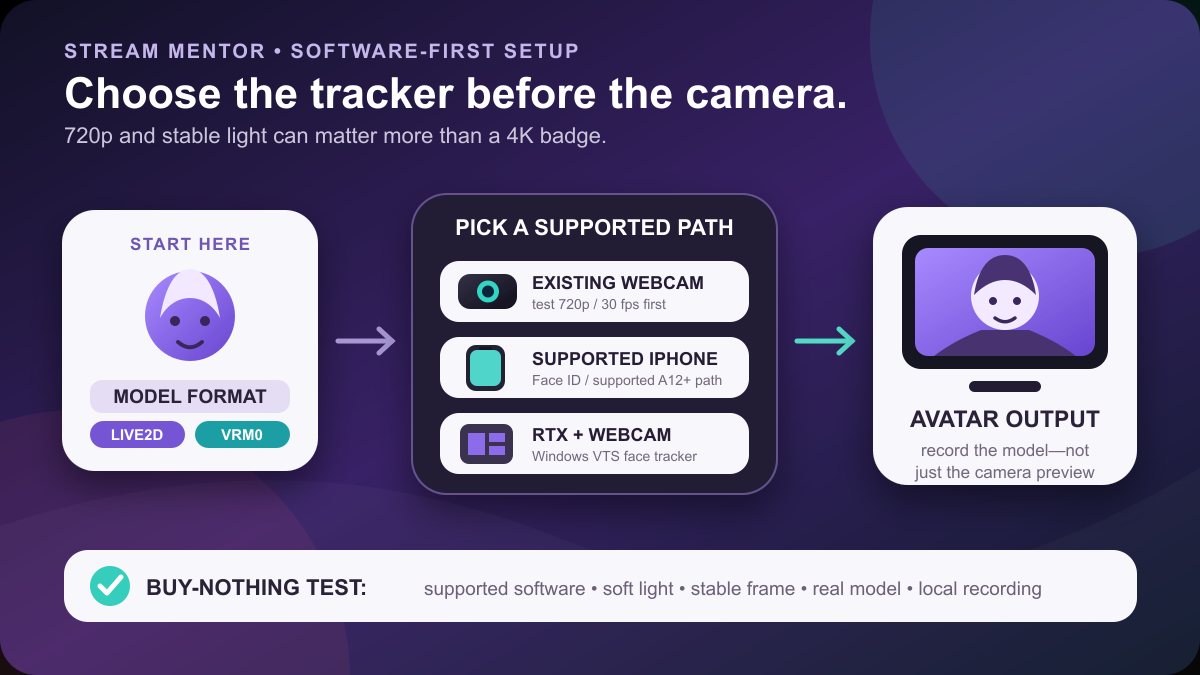
The site's complete VTuber workflow puts the model inside the broader channel setup. Its VTuber software guide covers tracking and performance applications, while the VTuber camera guide explains why model and software compatibility comes before buying tracking hardware.
Choose 2D, 3D, or commissioned before choosing software
| Path | Typical source | Finished model | Best fit | Main risk |
|---|---|---|---|---|
| 2D Live2D | Layer-separated illustration, commonly PSD | Live2D Cubism model and related textures/configuration | Illustrated character with expressive face-focused performance | Artwork was not separated for rigging or the commission excludes source/use rights |
| 3D VRM | VRoid Studio or another 3D package | VRM 1.0 or another version required by the chosen tracker | Full 3D character, body motion, reusable 3D workflow | The creator and tracker support different VRM versions |
| Premade model | Creator or model store | Whatever the listing explicitly delivers | Faster launch with limited customization | Non-exclusive design, hidden dependencies, or restrictive license |
| Commission | Illustrator, modeler, and/or rigger | Contract-defined files and rights | Distinct visual identity and planned expressions | Paying before formats, rights, milestones, and acceptance tests are defined |
Do not choose solely from a sample image. Write down the target model format, tracking software, operating system, expressions, body coverage, hand or face tracking needs, broadcast workflow, commercial use, and budget before comparing creators.
Path 1: create a 2D VTuber model with Live2D
Start with artwork prepared for movement
Live2D does not turn any flattened drawing into a fully expressive character automatically. Its official Cubism material describes a workflow that starts with an illustration, then uses modeling and animation to give that art a range of motion. Areas that need to move independently—such as eyes, pupils, brows, mouth shapes, front and back hair, face, neck, torso, and accessories—need appropriate separation and clean hidden edges.
If an illustrator is not also the rigger, ask the rigger for an art-preparation specification before the illustration begins. Repainting hidden areas and separating a finished flat file later can add cost and produce visible gaps.
Rig the artwork in Live2D Cubism
Live2D Cubism Editor is the modeling tool. Live2D says it can add motion, physics, lip sync, and other expression behavior while preserving the original illustration style. The work normally includes assigning art meshes, deformers, parameters, keyforms, physics, and expression behavior.
The Free and PRO editions have different current feature limits. Consult Live2D's live feature comparison rather than relying on an old table or assuming a free edition can open, edit, and export every purchased project unchanged.
Use Live2D's official Cubism tutorials and sample data to learn the file structure and workflow. Downloading a finished model is not the same as receiving its original illustration and editable Cubism project.
Load the finished model into a compatible tracker
VTube Studio's official requirements say it supports Live2D Cubism models and does not support VRM or VRoid 3D models. VTube Studio tracks and displays an already prepared Live2D model; it does not draw the character or replace Cubism rigging.
Before commissioning a rig, identify the parameters you want the tracker to drive. Eye movement, blink behavior, mouth shapes, head angles, body lean, breathing, hair physics, expressions, and toggles only appear when the model contains and maps the required behavior.
2D deliverables to request
- the original layered illustration at the agreed resolution;
- the editable Cubism project if included in the contract;
- the exported model files and textures required by the tracker;
- a parameter and expression list;
- hotkey or toggle documentation;
- the Live2D model version and target tracker version;
- licenses for fonts, brushes, stock, textures, and any third-party elements;
- written streaming, commercial, advertising, merchandise, modification, and portfolio rights.
A low-cost “model” may contain only a premade character or a non-editable export. That can be valid when clearly disclosed, but it should not be compared with a custom illustration, full rig, editable project, and broad commercial license as though the deliverables are identical.
Path 2: create a 3D VTuber model with VRoid Studio
Build the character in VRoid Studio
VRoid Studio is a character creator for anime-style 3D models. It provides adjustable body and face features, hair, clothing, textures, and accessories. It lowers the modeling barrier, but the resulting design can still require texture work, optimization, expression setup, clothing checks, and a compatible tracking application.
VRoid is a good starting path when its visual style and export format match the project. It is not evidence that every preset is exclusive or that every downloaded outfit is cleared for commercial streaming and merchandise.
Export and preserve the VRM license information
VRoid's current export guide says the current dress-up workflow exports VRM 1.0. It lets the creator review texture quality and model information, and it can populate item, author, and license URLs when included assets provide them.
Do not delete or falsify attribution and license fields. VRoid's Studio Guidelines allow broad commercial use of default data when no special clause applies, but assets with special clauses keep their own restrictions. Content made by another creator—such as an outfit or texture—must follow that creator's license.
Match the VRM version to the tracker
“Supports VRM” is incomplete without a version. The official VRM 1.0 specification describes the modern format, while older applications may still expect VRM 0.x. VSeeFace's current official documentation, for example, says it supports VRM0 and VSFAvatar but not VRM 1.0.
That creates a real compatibility check: VRoid's current export can be VRM 1.0 while a chosen tracker can require VRM0. Do not follow a random converter or downgrade tutorial without verifying the tool's source, current maintenance, license handling, model behavior, and compatibility. The safer order is to choose a currently supported tracker and then build or commission the exact format it accepts.
Test the 3D model beyond the default pose
Check facial expressions, eye and mouth movement, hair and clothing physics, shoulder and elbow deformation, seated posture, hand visibility, camera framing, texture memory, and performance in the real broadcast scene. A model that looks correct in a character creator can clip or deform under tracking.
Record locally with the game, browser sources, alerts, tracking, and encoder active. The tracker, rendering application, game, and broadcast software share CPU, GPU, memory, and camera resources.
Path 3: buy a premade model or commission a creator
Define the scope before choosing a marketplace
A marketplace is only a transaction and discovery layer. It does not make every listing original, compatible, secure, or licensed for your business. Compare individual creators by verifiable work, written deliverables, current technical knowledge, communication, and protected payment terms.
Do not send a selfie, legal name, private concept document, channel credentials, or identity files merely because a seller asks. Share only what the agreed design needs, through the platform's intended communication and file-transfer path. Never give a model artist access to your YouTube, Twitch, Steam, or email password.
Use a deliverables matrix
| Question | 2D answer should name | 3D answer should name |
|---|---|---|
| Source | Layered art format and editable Cubism project | Editable modeling project, textures, and source assets |
| Runtime export | Live2D model version and target tracker | VRM version or other exact format and target tracker |
| Rig scope | Angles, eyes, mouth, body, physics, expressions, toggles | Skeleton, face shapes, body/hand support, physics, expressions |
| Rights | Streaming, commercial, merchandise, modification, source transfer | Same rights plus licenses for bases, clothing, hair, and plugins |
| Acceptance | Files load in the agreed tracker and mapped parameters work | File loads in the agreed tracker/version and deforms correctly |
Separate art, rigging, and tracking fees
A quote can cover illustration only, rigging only, modeling only, or the complete stream-ready package. Ask for each layer as a line item so you know what is missing. Avoid publishing universal price ranges: complexity, exclusivity, rights, experience, revisions, source files, platform support, and local market all change the scope.
Verify ownership and reuse rules
Ask whether the design is exclusive, whether the creator may resell the base or full model, whether you can modify or hire another rigger later, and whether the creator may display the work in a portfolio before your debut. A premade model can be a sensible budget choice, but viewers may see the same base or character on another channel.
Do not commission a near-copy of an anime, game, celebrity, or other VTuber character without the necessary rights. Changing colors or a few accessories does not automatically make a copied design lawful or distinctive.
VTuber avatar compatibility checklist
- Name the model format and version. “2D,” “3D,” and “VRM” are not precise enough.
- Name the tracking application and supported version. Check its current official requirements.
- Name the operating system. Some trackers or features are Windows-only or have different mobile paths.
- List the tracked features. Face, eye, mouth, hands, upper body, and full body can require different inputs and rigging.
- List required hardware. Webcam, supported phone, depth sensor, hand tracker, or motion hardware should be explicit.
- Confirm export and source files. A runtime model is not necessarily editable.
- Inventory third-party assets. Record author, license URL, attribution, and restrictions.
- Open the model in the real tracker. Do not accept only a prerecorded demonstration.
- Run a local broadcast test. Include the final scene, encoder, game, alerts, and audio.
- Back up the accepted delivery. Keep source, export, license records, invoices, and a known-working application version.
How to test a model without pretending it was professionally benchmarked
A practical acceptance test does not need a laboratory, but it needs a written method. Record the tracker name and version, model version, camera or phone, lighting, computer, scene, and test date. Then check:
- neutral calibration and recovery after moving out of frame;
- blink, gaze, brows, mouth shapes, smiles, and head angles included in the rig;
- hair, clothes, accessories, and physics during normal movement;
- hotkeys, expressions, props, and toggles one at a time;
- transparent background or capture method in the broadcast scene;
- CPU, GPU, memory, camera stability, and encoder health during a local recording;
- license and attribution information in the delivered files;
- a clean restart from documented installation steps rather than the creator's already configured computer.
This shows whether one delivery meets the agreed workflow. It does not prove a tool is universally “best,” that tracking works on every computer, or that a marketplace seller is reliable for everyone.
Privacy, licensing, and file safety
Protect personal information
A character creator may process photos, voice, camera data, account details, or cloud files. Read the current privacy policy and permissions before uploading biometric-looking imagery or connecting a platform account. Prefer local workflows when cloud processing provides no necessary benefit, and remove unused integrations after testing.
Keep the raw camera out of every broadcast scene unless you intentionally show it. Use studio mode and local recordings to check scene transitions, virtual cameras, screen shares, and window capture before going live.
Keep a license ledger
Create a simple record for every component: asset name, creator, source URL, purchase date, license text or screenshot, permitted uses, attribution, and file location. Store it with the project. If a creator changes a store page later, you still need evidence of the terms attached to your purchase.
Commercial streaming permission does not necessarily include merchandise, model resale, editable-source transfer, public download, AI training, or use by a future agency. Ask instead of inferring.
Install files conservatively
Download software from the creator's official site, verified store, or repository. Scan archives, keep the operating system and security tools current, and avoid running an unknown executable just to unlock a model. Project files and plugins can contain scripts; open a copy, preserve a backup, and check dependencies before granting permissions.
Common VTuber avatar creator mistakes
Choosing a tracker before understanding the model
VTube Studio is for Live2D models, while a 3D tracker expects a supported 3D format. Start with the desired visual and performance style, then verify the exact model-to-tracker contract.
Calling a character creator a complete production pipeline
A preset-based creator can produce a strong base model, but you may still need original textures, expressions, optimization, tracking setup, and broadcast composition. List the missing layers rather than treating them as a surprise.
Buying art that was not prepared for rigging
A flattened portrait is not a Live2D model. Get the layer specification from the intended rigger first and include hidden-area cleanup in the art scope.
Ignoring VRM versions
VRM 0.x and VRM 1.0 support is not interchangeable. Confirm both exporter and tracker before commissioning or converting a model.
Assuming “free” means no restrictions or no cost
Software can be free while art, rigging, assets, commercial rights, hardware, and time are not. Presets and community assets can carry separate licenses even inside a free tool.
Paying for a commission without an acceptance test
Define the target software, file versions, mapped parameters, deliverables, revisions, and test steps before the final payment milestone. A video preview cannot replace opening the delivered files.
Frequently asked questions
What is the best VTuber avatar creator for beginners?
For 3D anime-style models, VRoid Studio offers a documented character-creator workflow and current VRM 1.0 export. For 2D, Live2D Cubism is the modeling and rigging tool, but it starts with properly separated artwork. Neither is universally best; choose the format your target tracker supports.
Can I make a VTuber avatar for free?
You can start with free software tiers, presets, and self-created art, subject to their current terms and feature limits. A finished original model can still require substantial illustration, modeling, rigging, texture, and learning time. Do not use unlicensed assets to make the budget appear free.
Does VTube Studio make VTuber avatars?
No. It loads and tracks compatible Live2D Cubism models. The artwork and rig need to be created before they are used in VTube Studio.
Does VTube Studio support VRM or VRoid models?
No. VTube Studio's official requirements say it supports Live2D models and does not support VRM or VRoid 3D models.
Can VSeeFace use a model exported by current VRoid Studio?
Check versions carefully. VRoid's current export guide describes VRM 1.0, while VSeeFace's current official page says it supports VRM0 and not VRM 1.0. Do not assume direct compatibility or use a converter without verifying its current documentation and license handling.
Should I buy a premade model or commission one?
Choose a premade model when its design, non-exclusivity, format, dependencies, and license meet the need. Commission when a distinct identity, specific expressions, source files, or broader rights justify the scope. In both cases, require a compatible test and written asset chain.
What files should a VTuber artist give me?
It depends on the contract. For 2D, ask about layered art, editable Cubism project, exported model, textures, expressions, and parameter documentation. For 3D, ask about editable source, textures, exact VRM or runtime format version, expressions, dependencies, and licenses. State which source files and rights are included before paying.
Sources and review scope
- Live2D: Cubism Editor overview, current Free/PRO comparison, and official tutorials for the 2D art, modeling, rigging, and feature workflow.
- VRoid: VRoid Studio, its current VRM export guide, and Studio Guidelines for format, embedded license information, default-data use, and asset-specific clauses.
- VRM Consortium: VRM 1.0 specification for the current format and licensing metadata model.
- VTube Studio: official introduction and requirements for Live2D-only model support and tracking inputs.
- VSeeFace: official requirements for its current VRM0, VSFAvatar, platform, and model-format limits.
Sources were reviewed on July 24, 2026. Stream Mentor did not commission an illustrator or rigger for this revision, purchase models, audit source code, or benchmark every tool. Prices, free-tier limits, operating-system support, format support, licenses, and privacy terms can change. Check the first-party page and exact deliverables before installing, uploading personal data, or paying.