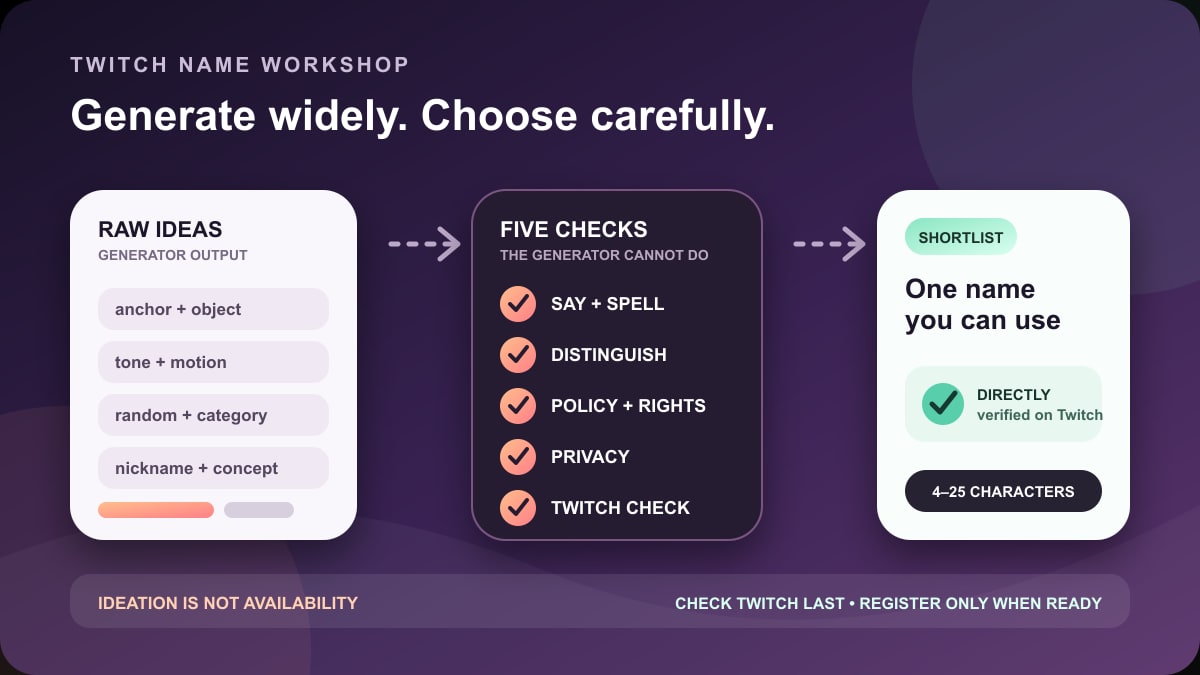
Quick answer: use a Twitch name generator to create raw material, not to choose your identity for you. SpinXO is the fastest guided starting point, Jimpix gives the most control over word combinations, and NordPass is useful for length-controlled or more random ideas. Then run the shortlist through Namechk for a secondary cross-platform collision scan and confirm the final username inside Twitch.
No third-party generator can promise that a name is available, permitted, memorable, safe to use as a brand, or a good fit when spoken aloud. Twitch's own signup or username-change field is the authoritative availability check. A public channel page failing to load does not prove a name can be registered; Twitch can withhold abandoned, banned, Partner, or otherwise unavailable usernames.
Checked July 24, 2026: Stream Mentor manually reviewed the public interfaces and documentation for these four current tools, Twitch's account and username-transfer documentation, and Twitch's username safety rules. The former guide said six tools were “fully tested” without recording a method, ranked stale sites, and treated generated suggestions as ready-made brands. We removed those unsupported claims and the old screenshots. We did not create tool accounts, grant Twitch access, or register generated names.
Best Twitch name tools by job
| Tool | Best use | Useful controls seen in this review | Important limit |
|---|---|---|---|
| SpinXO | Quick, Twitch-oriented brainstorming | Themes, styles or “vibes,” personalization, and batches of 30 suggestions | Generated or “available” language is not Twitch approval |
| Jimpix | Combining one meaningful word with controlled categories | Category, length, starting letter, word position, filtering, and optional transformations | Many controls create noise; every result still needs Twitch and policy checks |
| NordPass | Length-constrained, category-based, or random ideas | Keyword, length slider, categories, random-character and leet-style options | Its visible availability shortcuts do not establish Twitch availability |
| Namechk | Secondary collision scan after generating a shortlist | Checks a name across many social platforms and domain extensions, including Twitch | Automated checks can be delayed or wrong; verify on each platform |
There is no meaningful “best overall” without a naming problem. Someone with a strong nickname needs controlled variations; someone protecting their offline identity may want more random ingredients; someone building across video, social, and a website needs a collision scan. Start with the row that matches the job, not the site with the largest claim.
1. SpinXO: fastest guided Twitch brainstorming
SpinXO has a dedicated Twitch name generator and displayed 30 suggestions per spin during this review. Its interface offered theme or category choices, styles such as short, funny, aesthetic, mysterious, and rhyming, plus personalization controls. That makes it useful when “give me a random username” is too broad but you do not yet have a naming formula.
Use it like this:
- Select the tone and category that genuinely fit the channel rather than whichever sounds most “viral.”
- Run one batch and save only the useful parts: a sound, word pair, rhythm, or structure.
- Change one input and run a second batch. Do not keep spinning until the first acceptable cliché appears.
- Rewrite the best fragments in your own words before checking them on Twitch.
A generated result should be treated as a prompt. SpinXO's current page makes broad statements about memorable names and availability tools, but it cannot evaluate whether viewers confuse the spelling, another creator already built goodwill around a similar name, or the name crosses a policy or trademark boundary.
2. Jimpix: best for controlled word combinations
Jimpix's current generator lets you enter your own word, select a category for the added word, restrict length or starting letter, and decide where your word appears. Its expanded “bells and whistles” include transformations such as reversing, shuffling, chunking, adding numbers, changing capitalization, and filtering for text at the start, end, or anywhere in a result.
This control is useful when one part must remain recognizable: a nickname fragment, an invented mascot, a craft, a recurring series, or a non-sensitive local word. Instead of asking for an entire brand, ask Jimpix for different partners around that anchor.
A disciplined Jimpix pass:
- Enter one anchor that you would still want to say a year from now.
- Choose a concrete category—animals, space, color, motion, music, or another channel-relevant set.
- Keep the total within Twitch's current 4–25 character range.
- Try the anchor first and second; note which order is easier to say.
- Use number, leet, reverse, and shuffle options only when the result stays readable.
More transformation is not automatically more original. A string that replaces several letters with numbers may technically differ from a taken name while becoming harder to pronounce, type, caption, remember, and search. Use Jimpix's controls to narrow a concept rather than decorate it until nobody can repeat it.
3. NordPass: best for length and random separation
NordPass's public username generator offers an optional keyword, a length slider, categories such as movies, music, animals, space, food, nature, and sports, and advanced random-character or “leetify” choices. It is useful for two different jobs: keeping an idea inside a tight length, or generating words that are not connected to an offline identity.
The privacy tradeoff deserves attention. Using the same distinctive handle everywhere makes a creator easier to find across platforms, but it also makes those accounts easier to connect. A streamer who deliberately separates personal and creator identities should avoid real birth years, school or employer references, full legal names, phone fragments, exact location clues, and usernames already tied to private profiles.
NordPass's visible availability links during this review covered services such as YouTube, Reddit, Pinterest, and Vimeo; they were not an authoritative Twitch registration check. Regardless of which icon a generator provides, enter the final candidate on Twitch yourself.
4. Namechk: best as a second-pass collision checker
Namechk is not the first generator to open. It is the useful step after a shortlist exists. Its current site says it checks dozens of domain extensions and many social services, including Twitch, YouTube, TikTok, and other platforms. That can reveal an obvious collision before you commit artwork and links.
Do not interpret a green or dim tile as a guarantee. Automated services can encounter rate limits, changed platform pages, reserved names, network errors, or delayed results. Open the important platforms directly. On Twitch, the signup or Profile Settings availability result is decisive. On other platforms, use their own registration or rename interface.
A matching account does not always create a legal conflict, and an unregistered handle is not automatically safe. Search the exact phrase and close spellings on the web, video platforms, app stores, business directories, and relevant trademark databases. If the name will support a business, merchandise, sponsorships, or a registered mark, obtain appropriate legal advice rather than relying on a username checker.
Twitch username rules a generator cannot decide
Twitch's current account-creation guide requires a username between 4 and 25 characters. Twitch's Username Transfer Policy says open usernames are first come, first served and can be reclaimed or transferred for trademark infringement or active impersonation.
The Community Guidelines for usernames and display names apply a high standard because account names are persistent and highly visible. Twitch prohibits names involving areas such as threats, hateful conduct, targeted harassment, unauthorized private information, impersonation, certain sexual references, and other specified harmful content. A generator returning a string does not mean Twitch will permit it.
Check the full current policy rather than maintaining a private list of “banned words.” Meaning and context matter, policies change, and Twitch can reset a name or suspend an account depending on the violation. Do not modify a prohibited phrase with numbers or symbols to try to bypass signup protections.
Build a better shortlist than a generator can
Step 1: decide what the name must protect
Choose whether the channel is a public personal brand, a stage identity, a team, a show, or a deliberately separate pseudonym. That decision changes the word bank. A public professional may accept a real-name connection; a minor, teacher, healthcare worker, or anyone concerned about harassment may need much stronger separation.
Write three boundaries before generating:
- offline details that must never appear;
- topics the channel may expand into beyond its first game;
- words, jokes, identities, companies, or creators it must not resemble.
Step 2: create a small word bank
| Bucket | What to write | Illustrative ingredients |
|---|---|---|
| Channel action | What happens repeatedly | build, draw, route, solve, race, review |
| Tone | How the channel feels | calm, curious, precise, chaotic, warm |
| Concrete image | An object, place, animal, or material | beacon, moss, kiln, orbit, otter, copper |
| Motion or sound | A word that gives rhythm | drift, hum, dash, echo, loop, spark |
| Personal anchor | A safe nickname fragment or invented syllable | Use your own; do not publish sensitive clues |
Combine two buckets, then say each result aloud. The words in this table are ingredients, not available-name suggestions. For example, “tone + object” produces a different direction from “action + motion.” Generate ten structures before polishing spelling.
Step 3: run the spoken and visual tests
- Introduction test: say “Hi, I'm [name]” at normal speed three times.
- Raid test: imagine another streamer reading it without instructions.
- Spelling test: ask someone who only heard it to type it once.
- Chat test: view it in lowercase and next to badges, numbers, and other usernames.
- Overlay test: place it in a small 16:9 stream layout, not only a large logo.
- Expansion test: ask whether it still works if the channel changes games or formats.
Intentional ambiguity can be part of a character, but count its cost. If every verbal mention requires “with a zero, underscore, and two x's,” word-of-mouth becomes harder. A short name is not automatically good, and a longer name is not automatically bad; the useful measure is whether the intended audience can hear, remember, type, and distinguish it.
Step 4: score the final five
| Criterion | 0 points | 1 point | 2 points |
|---|---|---|---|
| Say it | Unclear without explanation | One likely hesitation | Natural on first reading |
| Spell it | Several hidden substitutions | One clarification | Listener types it correctly |
| Distinguish it | Looks like another creator or brand | Some crowded results | Clearly separable in its category |
| Fit it | Locks the channel to a passing joke | Works for current content | Works for current and plausible future content |
| Protect it | Reveals sensitive identity details | Some unwanted account linkage | Matches the chosen privacy boundary |
| Use it | Fails Twitch or a critical platform | Needs a reasonable variation | Passes direct checks on required platforms |
This 12-point worksheet is an editorial aid, not a performance formula. A name scoring 12 will not make a channel grow. It merely exposes compromises before the name appears in years of clips, links, alerts, invoices, and introductions.
Check availability in the right order
- Twitch first: for a new account, use Twitch's signup flow; for an existing account, use the username field in Profile Settings. A green availability check is more useful than a third-party page.
- Exact web search: search the quoted name, then close spellings and spoken equivalents.
- Creator platforms: directly check the services the channel will actually use, such as YouTube, TikTok, Instagram, Discord, Bluesky, or another relevant community.
- Namechk second: use it to find services you forgot, then confirm important results directly.
- Domains if needed: check the exact name and a sensible alternative; do not buy a pile of defensive domains without a real plan.
- Policy and rights: review Twitch safety rules, impersonation risk, existing brands, and appropriate trademark sources.
Do not message an account owner to arrange a username swap. Twitch says swapping names between accounts is unsupported and can result in both owners losing the usernames. Do not pay a stranger for an account or handle. Twitch's Community Guidelines also prohibit selling or sharing user accounts.
Security and privacy rules for name generators
- A public name generator does not need your Twitch password, stream key, recovery code, or two-factor code.
- Do not authorize a Twitch connection merely to receive text suggestions. If a tool requests OAuth, read the exact permissions and decline anything unnecessary.
- Do not enter a legal name, birth date, home town, school, employer, phone fragment, or address to make results “personal.”
- Use a password manager to create a unique password; the username and password should never be variations of the same phrase.
- Keep recovery email and phone information accurate and private, and enable Twitch's current security protections.
Cross-platform consistency and privacy pull in opposite directions. Reusing one handle makes promotion easier; separate handles make casual correlation harder. Decide intentionally. A generator's suggestion to “use the same name everywhere” is marketing advice, not a security rule.
Changing an existing Twitch name: read this first
Twitch currently lets users change a username once every 60 days, with a verified email. A change is not allowed during an active broadcast or while a VOD upload is pending. Twitch Support says it does not reverse accidental name changes for non-Partners.
The old channel URL does not redirect to the new one. Update channel links on websites, link-in-bio pages, video descriptions, overlays, panels, commands, sponsorship materials, social profiles, media kits, email signatures, and scheduled posts. Twitch says you may also need to regenerate the stream key, and some third-party applications may not recognize the renamed account automatically.
Followers, subscriptions, channel history, settings, and most account benefits remain, but that does not make the public migration automatic. The former name of a non-Partnered account will not become available for at least 180 days, and Twitch does not support swapping it to another account you own. Read the full Twitch name-change guide and make an inventory before confirming.
Frequently asked questions
What is the best free Twitch name generator?
SpinXO is a strong first stop for guided Twitch-oriented ideas; Jimpix is better when one word and its position need close control; NordPass is useful for length and random categories. All three were publicly accessible during this review. Use Twitch itself for final availability.
Can a generator find an available Twitch username?
It can propose or attempt to check one, but it cannot guarantee registration. Twitch says usernames are first come, first served and some names are withheld or unavailable even when no obvious public channel appears. Trust the current Twitch signup or rename interface.
How long can a Twitch username be?
Twitch's current account-creation documentation says 4 to 25 characters. Keep a candidate inside that range before spending time on logos or availability scans.
Should my Twitch and YouTube names match?
Matching handles can make a public creator brand easier to find, but reuse also links those profiles. Check the direct availability and impersonation landscape on both platforms, then choose consistency or separation according to your privacy plan. The display name can sometimes handle presentation differences without changing the underlying Twitch username.
What if the Twitch name I want looks inactive?
Twitch says it does not accept requests for already registered usernames outside its transfer policy, and old non-Partner usernames take at least 180 days to recycle after abandonment. Inactive appearance is not availability. Choose a distinct alternative instead of contacting the owner or trying to swap accounts.
Do numbers make a Twitch name bad?
No. A meaningful, easy-to-say number can work. A random birth year, long suffix, or letter-to-number substitution can reduce privacy and spelling clarity. Apply the spoken, typing, collision, and privacy tests rather than following a blanket rule.
Sources and review scope
- Twitch Help: Creating an Account with Twitch for the current 4–25 character requirement and direct availability behavior.
- Twitch Help: Username Transfer Policy for first-come registration, 60-day changes, old URLs, 180-day recycling, account swaps, third-party applications, and retained account data.
- Twitch Safety Center: Community Guidelines—Account Usernames and Display Names for prohibited naming categories and enforcement.
- SpinXO: Twitch Name Generator for the current guided interface, themes, styles, personalization, and 30-result batches.
- Jimpix: Username Generator and change log for word, category, position, length, filter, transformation, and current-maintenance context.
- NordPass: Username Generator for keyword, length, category, random-character, leet, and listed availability controls.
- Namechk: username and domain checker for its current multi-platform collision scan, including Twitch.
The public interfaces, policies, and visible search competition were reviewed on July 24, 2026. Stream Mentor did not create accounts, authorize Twitch, purchase domains, register the generated results, or perform a trademark clearance. Tool controls, policies, platform checks, and availability can change; repeat direct checks immediately before registration or rebranding.