
A great way to stay connected with your friends and potentially discover new Instagram users, artists, or brands, in addition to direct messaging, is by using tags on Instagram.
Capture someone's attention or evoke a cherished memory by tagging them in a post, story, reel, or comment.
Here is how to tag someone on Instagram, regardless of the post's type:
Tag someone on Instagram in 4 steps:
1. Upload a photo or video to an Instagram story or post,
2. Click on the "Tag people" button,
3. Type their username,
4. Publish your Instagram story or post.
If you want to explore more tagging options and learn how to tag someone in a published post or comment, you will find helpful tips and tricks here!
What Are Tags and How Do They Work?
Instagram tags allow you to interact more effectively with users on the Instagram app.
Tagging someone in a post will notify other Instagram users, enabling them to view the post.
Tagging someone can be done purely for fun in photos or videos. For example, you might encounter a meme, and instead of sharing the post with your friends using the share option, you can simply tag someone in the comment section.
How to Tag Someone on Instagram?
Tagging someone on the Instagram app takes only a few taps.
If you're curious about how tagging someone works, let me explain that there are essentially four ways to tag someone technically.
1. Tag someone in your Instagram Story
While enjoying lunch or attending a special event, you take a picture with your friends, family members, and yourself. Share it on your Instagram story, but be sure to tag everyone in the photo.
To accomplish this, open the story post options and tap on the Alphabet icon. Allow me to demonstrate:

After tapping the alphabet icon, simply enter the @ symbol and start typing the name of the Instagram account you wish to tag.
The Instagram app will offer suggestions, so make sure to locate the person you wish to tag. It will appear something like this:

Once you have found the account, you can move it and position it anywhere you wish over the image.
Alternatively, if you wish to enter the influencer world, tag brands when there are visible logos or any other elements in your story post that can be linked to a brand of your choice.
2. Tag Someone Before You Publish
Whether you want to create an Instagram photo or reel post on your account, you can tag someone prior to publishing your post.
After cropping, editing, and preparing your video for posting, review your post options and tap the "Tag People" button. Then, simply add other users and tap "Post" in the top-right corner.
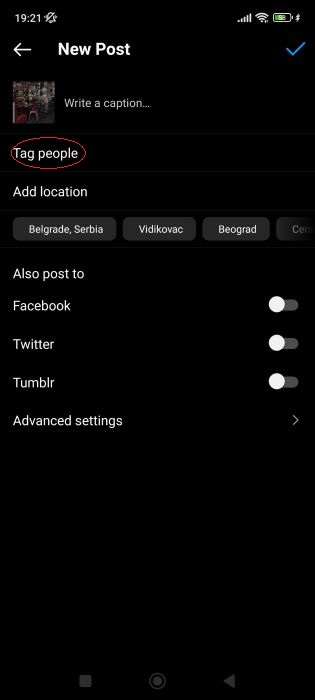
3. Tag Someone in a Published Post
If you forgot to tag your friends or want to add more tags, don't worry. You can easily add your initial tag or include additional ones. Once you've decided where to tag, tap the posts you wish to edit, and then tap on the three dots or three lines in the top-right corner:

When you tap there, a menu will appear. Here, you can select the edit button:
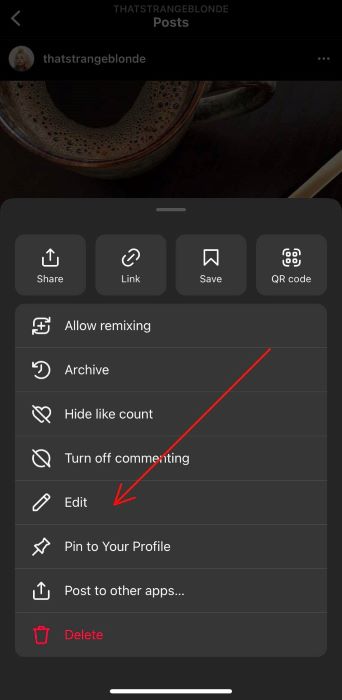
Once you tap to edit, you will enter editing mode. You can modify your post caption or simply tap "tag people." When you are finished, tap the done button.

4. Tag Users in the Comments Section
If you're anything like me, you often scroll extensively on the Instagram app. When I encounter an Instagram profile or something that reminds me of my friends, I go to the comment section, type @, and then enter the name of their account.

Importance of Instagram Tags
Tagged posts, including photos and videos, will help you manage your account and improve your content. Additionally, remember that tags are a valuable feature for Facebook products, as they can enhance the content on Facebook.
Instagram features can enhance your posts, but tagged posts offer crucial reach and assist you in connecting with individuals and brands.
The term collab post is widely used in the influencer community. In a collab post that includes multiple users, tagging is crucial.
Mutual tagging of users is essential, as it enhances their reach by promoting others and sharing them with your own audience.
Today, being tagged in posts has evolved into a distinctive form of communication. Memes, advice pages, and inspirational quotes—tag along (pun intended) and tag your friends!
Tagging a Private Account
The key aspect of a private account is privacy—it exists for a reason, which will inevitably influence tagging practices.
Not everyone on Instagram can see their posts. Only those individuals they have approved are included on the followers' list.
Private accounts must approve tags manually.
You can tag them if you are following them, but only those on their follower list will be able to see the tagged posts.
You can also adjust your privacy, security, and reporting settings by tapping the three lines in the upper-right corner. Next, tap on settings:
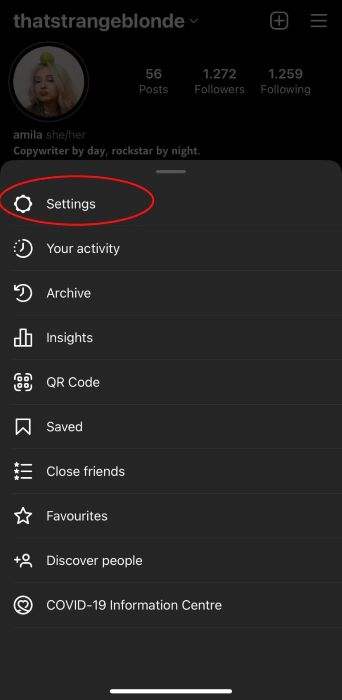
When you open the settings, make sure to tap on privacy.
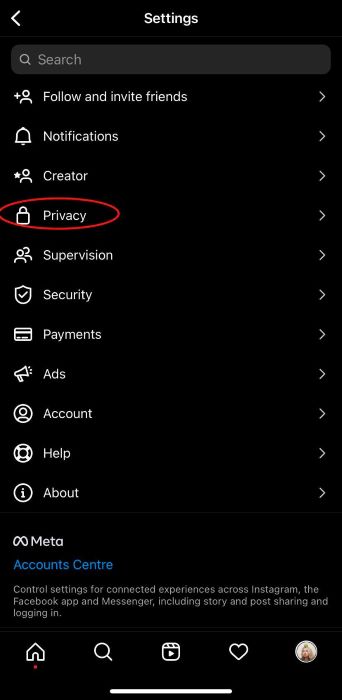
Once you tap on privacy, you can modify your account's privacy settings to suit your needs and preferences.
Difference Between Tags and Hashtags
Both Instagram hashtags and tags help you identify something or someone more accurately.
The difference here, however, is that hashtags are used in posts to target a specific audience or to attract a particular audience to you.
Tags are utilized to pin and identify particular people, products, events, or accounts.
We note that hashtags impact groups and audiences, whereas tags are specifically intended to identify individual accounts.
Conclusion
Tags are a great way to strengthen your brand and engage with new users.
They can help you reconnect with people you haven't seen in years or assist you in finding that one skincare product you've been searching for all day on your Instagram feed.
Effortlessly tag faces, brands, or products in your photo or video Instagram posts with just a few taps.
FAQ
What does it mean to tag someone on Instagram?
Tagging someone in a story, photo, or video post on Instagram serves to identify, pin, or mark a specific user or branded account.
How to hide tagged photos from Instagram?
Tap, remove, and move on.
How to untag yourself from Instagram?
If you would like to remove yourself from a tagged post, open the Instagram post and tap your username. Then, simply tap on Remove me from the post.