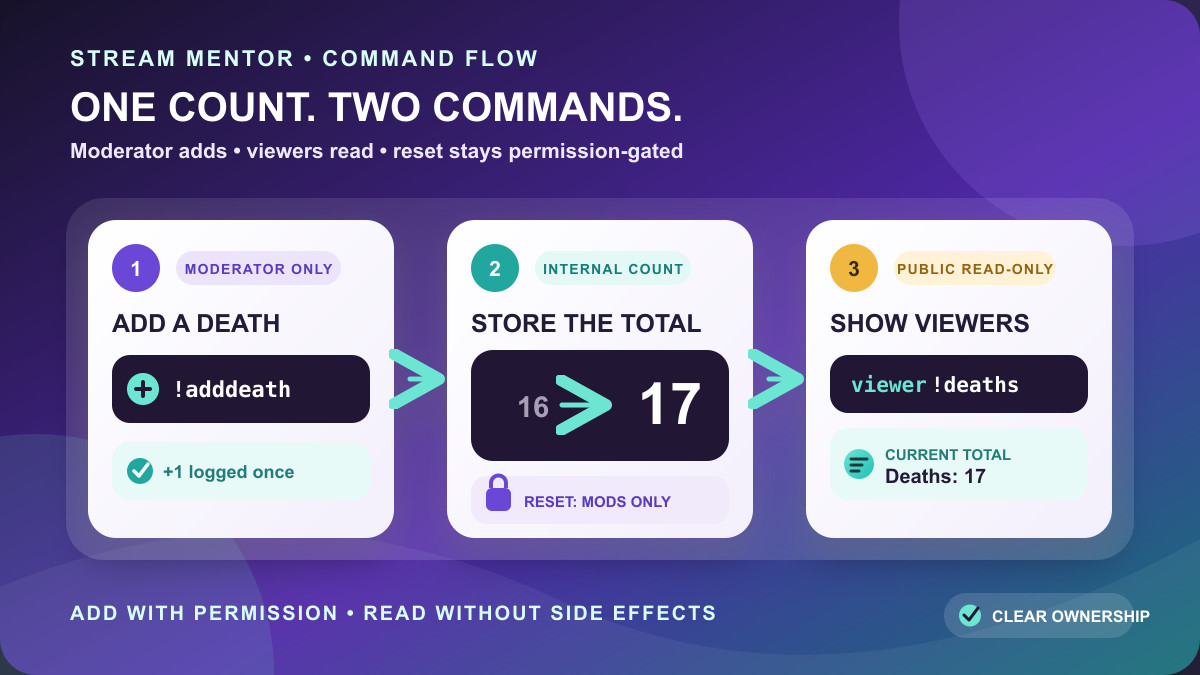
Quick answer: Nightbot does not have a separate built-in “death counter” feature. The reliable native setup uses two custom commands: a moderator-only command containing $(count) to add a death, and a public command containing only static text so viewers can read the total without increasing it.
Editorial review — July 24, 2026: this guide was substantially rewritten after checking Nightbot's current command, variable, Control Panel, setup, and API documentation, plus the NightDev community threads that document the counter-reset pattern omitted from the main guide. We verified the syntax against those sources, but we did not sign in to or execute the commands in an authenticated Nightbot channel. The test sequence below is therefore a required final check in your own channel.
The two commands you need
These are the two core commands to paste into Twitch chat as the channel owner or a moderator. Each line is one complete chat message.
!commands add !deaths -cd=5 Deaths this run: 0
!commands add !adddeath -ul=moderator -cd=5 -a=!commands edit !deaths Deaths this run: $(count)
After adding them:
- A viewer types
!deathsto read the current number. Calling it does not change the total. - The owner or a moderator types
!adddeathafter a death. That increments the private working count and updates the public!deathsmessage. - Anyone can then type
!deathsto see the new total.
The add, user-level, cooldown, and alias syntax comes from Nightbot's official documentation for !commands. The two-command arrangement is the practical pattern documented by NightDev community contributors in the death-counter setup thread and a more recent counter display and reset thread.
Why a Nightbot counter needs two commands
Nightbot's official Count variable documentation says $(count) prints how many times the command has been used. On its first successful call it returns 1, then 2 on the next call, and so on. The count belongs to the command containing that variable.
That behavior creates a problem if !deaths itself contains $(count): every viewer who only wants to check the total also adds one. Changing its user level to Moderator stops viewers from changing it, but then viewers cannot read it either.
The split setup avoids that conflict:
!adddeathcontains$(count), so this is the command that owns and increments the working count.!adddeathis restricted to the Moderator user level.- Its alias passes an edit instruction to Nightbot's official
!commandscommand. - Nightbot resolves the new number, then changes
!deathsto static text such as “Deaths this run: 4.” !deathscontains no Count variable, so viewers can call it without changing anything.
This is a native Nightbot chat-command workflow. It does not require an OAuth token, a third-party counter API, browser cookies, or a pasted secret. Never put a Nightbot access token, Twitch token, password, stream key, or session cookie into a public command.
Before setting up the counter
- Sign in directly at nightbot.tv with the channel you intend to manage.
- Use the dashboard's Join Channel control and follow Nightbot's platform-specific moderator instructions. Nightbot's official setup guide documents this step.
- In Commands → Default, confirm the
!commandsdefault command is enabled. The updater relies on it. - Remove or rename any existing
!deathsor!adddeathcommand before adding this version. - Decide who may write the count. This guide uses
moderator; useownerinstead if only the broadcaster should change it.
The examples focus on Twitch because that is the main intent behind this page. Nightbot also documents custom-command support for other connected services and a separate Discord integration. Platform roles and live-chat availability differ, so do not assume a Twitch moderator setting maps to another service until its role mapping is configured and tested.
Set up the death counter in the Nightbot dashboard
If you prefer forms to chat syntax, open Commands → Custom in the Nightbot Control Panel and create the following two commands. Nightbot's Control Panel documentation defines the Command, Message, Userlevel, Cooldown, and Alias fields.
| Field | Public display command | Moderator increment command |
|---|---|---|
| Command | !deaths | !adddeath |
| Message | Deaths this run: 0 | edit !deaths Deaths this run: $(count) |
| Userlevel | Everyone | Moderator |
| Cooldown | 5 seconds | 5 seconds |
| Alias | None | !commands |
Save both commands, then run the test checklist later in this guide. The five-second cooldown is a modest starting point, not a rule. Increase the public command's cooldown if viewers repeat it enough to bury conversation.
Set up the same counter from chat
Nightbot officially documents this pattern for creating a command:
!commands add !command_name -ul=userlevel -cd=cooldown -a=!alias command responseApplied to this counter, the first command creates the public static display:
!commands add !deaths -cd=5 Deaths this run: 0The second creates the protected updater:
!commands add !adddeath -ul=moderator -cd=5 -a=!commands edit !deaths Deaths this run: $(count)You can replace “Deaths this run” with a channel-specific message, but preserve the command names and $(count) placement while testing. If you rename !deaths, you must also change the name after edit in the updater. If you rename !adddeath, use that new name in every reset or set-count instruction below.
When a moderator calls !adddeath, Nightbot normally responds that !deaths was edited successfully. It does not also print the updated public message. A NightDev community answer explains that a command can have only one alias and an aliased command cannot be chained into another alias. Call !deaths when you want the total displayed in chat.
Reset the Nightbot death counter to zero
A reset must update two separate states:
- the internal Count value owned by
!adddeath; and - the static text currently stored in
!deaths.
If you reset only !adddeath, viewers can still see the old number in !deaths. If you change only the public text to zero, the next increment continues from the old internal value. This stale-display trap is the main reason many copied reset commands appear broken.
Reset directly from chat
As the owner or a moderator, run both lines:
!commands edit !adddeath -c=0
!commands edit !deaths Deaths this run: 0
The -c=0 chat flag is not described on Nightbot's main !commands page. It is a community-supported control confirmed in NightDev counter threads, including the starting-number discussion. Nightbot's official API reference independently confirms that each custom command has an editable numeric count field and that it increments only when the command uses the Count variable.
Create reusable reset helpers
If you reset at the start of every game or stream, add these two moderator-only helpers from chat:
!commands add !resetdeaths -ul=moderator -a=!commands edit !adddeath \-c=0
!commands add !zerodeaths -ul=moderator -a=!commands edit !deaths Deaths this run: 0
Then reset by calling:
!resetdeaths
!zerodeaths
The backslash before -c=0 is deliberate when the helper itself is created in chat. It prevents the outer !commands add operation from consuming the count option instead of saving it in the helper's message. If you build !resetdeaths in the dashboard, enter Message edit !adddeath -c=0, Userlevel Moderator, and Alias !commands; do not enter the backslash in the dashboard field.
Some community examples reset !adddeath to -1 and then call !adddeath once so its next resolved value becomes zero. That works around the static display, but it makes an “add death” call perform a reset sync. The two-state workflow above is clearer: reset the internal count to zero and explicitly set the public message to zero.
Set or correct the counter to a specific number
If the current total should be 7, update both states to 7:
!commands edit !adddeath -c=7
!commands edit !deaths Deaths this run: 7
Replace 7 with the intended non-negative whole number. After both edits, !deaths should show 7, and the next genuine !adddeath call should update it to 8.
In the Control Panel, edit !adddeath and set its Count field to the desired value, then edit the !deaths Message to the same value. A NightDev staff answer notes that the Count field may appear after a command containing $(count) has been called for the first time. If it is not visible on a new command, perform the initial test call, then reset both states.
Test the setup before relying on it live
Run this complete test with one owner or moderator account and, if possible, one ordinary viewer account:
- Call
!deaths. Expected result: “Deaths this run: 0.” - From a normal viewer account, try
!adddeath. Expected result: it does not update the counter because the command is Moderator-only. - From the owner or moderator account, call
!adddeathonce. Expected result: Nightbot confirms that!deathswas edited. - Call
!deaths. Expected result: “Deaths this run: 1.” - Run both reset actions, then call
!deaths. Expected result: 0. - Set both states to 7, then call
!deaths. Expected result: 7. - Call
!adddeathonce and then!deaths. Expected result: 8.
Do not skip the normal-viewer check. A counter can appear correct for the owner while an accidental Everyone user level lets any viewer change it.
Troubleshooting
| Problem | Likely cause | What to check |
|---|---|---|
!deaths adds one | The public command contains $(count) | Replace its message with static text; keep the variable only in !adddeath |
| A viewer can add deaths | !adddeath is set to Everyone | Change its Userlevel to Moderator or Owner |
!adddeath does nothing | Nightbot is absent, !commands is disabled, an alias is wrong, or cooldown is active | Confirm Nightbot joined, enable the default command, and match the dashboard table exactly |
| Nightbot posts stream information instead of a count | An old example includes an unnecessary Twitch lookup | Use the updater in this guide; it needs only edit !deaths ... $(count) |
| Reset succeeds but viewers see the old total | Only the internal count was reset | Also edit the static !deaths message to zero |
| The next death jumps back to the old sequence | Only the public text was changed | Also set !adddeath's internal count with -c= or the dashboard Count field |
| The reset helper saved incorrectly | The nested -c=0 option was consumed while creating it | Use \-c=0 in the chat creation string, or configure the helper through dashboard fields |
| Nightbot is missing on YouTube | The stream is not live and public | Nightbot's setup guide says its YouTube bot joins only for a live, public stream |
If a copied shorthand such as !addcom or !editcom creates an alias error, return to the full official forms used here: !commands add and !commands edit. Also verify every leading exclamation mark and command name; changing the trigger word alone does not fix a malformed message or permission.
What this setup can and cannot do
- It can: keep one command-level total, restrict increments to moderators, let viewers read without adding, reset to zero, and correct the value.
- It cannot: detect an in-game death automatically. A moderator or the owner must call the updater unless a separate trusted integration supplies that event.
- It is not an OBS overlay: the native pattern updates chat-command text. It does not create an on-screen graphic or text-file source for the broadcast.
- It is not per viewer: the Count variable belongs to the command, not to each chatter.
- It is not automatically per game: create a separate command set or deliberately reset when switching games.
- It does not decrement by one natively: correct the count to a known value with the dashboard or
-c=workflow. - It cannot safely hide a public secret: anything placed in a command response may be exposed in chat or the command editor.
If you need automated game detection, a persistent on-stream overlay, per-user totals, several related counters, or reliable addition and subtraction, use a purpose-built local automation tool or an integration you control. Do not paste OAuth credentials into a forum-generated command to force Nightbot beyond its native model.
Frequently asked questions
Is the Nightbot death counter a built-in command?
No. It is a custom setup built from Nightbot's general Count variable, custom commands, aliases, and user levels. The term “death counter” describes how streamers use those tools, not a separate Nightbot feature.
Why does !deaths not contain $(count)?
Because the Count variable increments when its command is called. Keeping the public response static allows any viewer to check the total without changing it. The protected !adddeath command owns the real working count.
Can the increment command show the new number immediately?
Its alias is already being used to edit !deaths, so Nightbot normally returns an edit-success message. Call !deaths to post the updated total. Native Nightbot aliases cannot be chained indefinitely to edit and then invoke another aliased response.
Can VIPs add deaths?
Nightbot's documented Twitch-specific user level is twitch_vip. You may use that instead of moderator, but it broadens write access. Test it with a real VIP account and use Moderator when only trusted channel staff should control the count.
Does this work in Discord?
Nightbot says connected custom commands can work in Discord, but Discord moderator access depends on the roles mapped in Nightbot's integration settings. This article's chat-management workflow was researched for Twitch and was not live-tested in Discord, so verify the updater and both reset states in a private channel before depending on it.
Sources and verification scope
- Nightbot Documentation: Count variable.
- Nightbot Documentation:
!commands, aliases, user levels, and cooldowns. - Nightbot Documentation: Control Panel custom commands.
- Nightbot Documentation: General setup and joining a channel.
- Nightbot API Reference: custom-command Count field.
- NightDev Community: moderator updater and public display pattern.
- NightDev Community: display-without-increment and reset behavior.
- NightDev Community: setting the command count in chat or the dashboard.
These sources were checked on July 24, 2026. Stream Mentor verified the documented behavior and cross-checked the community-supported counter pattern, but did not authenticate to a Nightbot account or run a live channel test. Nightbot can change command parsing, platform permissions, and dashboard fields; complete the test checklist in your own channel and prefer the current official documentation if its interface differs.