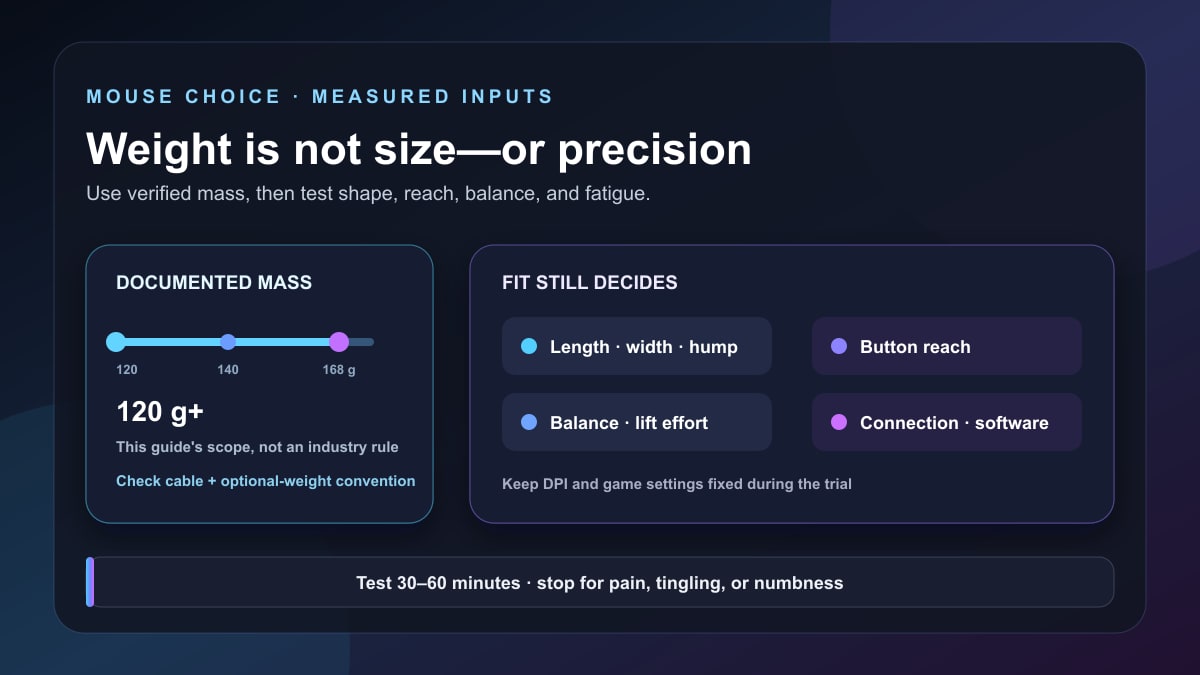
Quick answer: if you deliberately want a heavy gaming mouse, start with shape and button access, then compare verified weight, size, connection, software, and return policy. This guide uses 120 g or more without the cable as its editorial scope; that is not an industry definition or a claim that heavier is better.
Four current source-based examples are the 168 g ASUS ROG Spatha X, 134 g Razer Naga V2 Pro, 121 g Logitech G502 HERO with up to 18 g of optional weights, and 123 g ASUS ROG Chakram X Origin. They are not ranked because Stream Mentor has not performed a controlled comfort, latency, sensor, or durability comparison.
Editorial update: Stream Mentor completely rebuilt this page on July 24, 2026. The previous article ranked nine mice, claimed they were tested and reviewed without a method, included discontinued or hard-to-verify products, and suggested weight inherently improves precision. Those claims, rankings, prices, sales links, and three reused images have been removed.
Should you use a heavy gaming mouse?
Weight changes how much force is required to start, stop, and redirect a mouse. Some people prefer a planted feel, a large chassis, many controls, or adjustable mass. Others experience fatigue or lose speed. Neither preference proves accuracy.
A heavy mouse makes the most sense when at least one of these is intentional:
- you want a large palm-supporting body;
- you need many accessible MMO, productivity, or streaming shortcuts;
- you prefer tunable weights and want to compare settings yourself;
- you value a charging dock, interchangeable controls, joystick, or other hardware that adds mass;
- you already know from extended use that a light mouse feels unstable to you.
Do not use total weight as a proxy for size. A dense compact mouse and a wide large mouse can weigh the same and fit differently. The site's mouse guide for larger hands treats physical dimensions and button reach as a separate intent.
Current heavy and weight-tunable options
Specifications and visible US availability were checked July 24, 2026. Weight conventions differ, so read each manufacturer's note on cable, receiver, weights, and accessories.
| Mouse | Listed weight | Documented distinction | Fit or workflow to verify |
|---|---|---|---|
| ASUS ROG Spatha X | 168 g without cable | Large right-handed MMO body, 12 buttons, wired/2.4 GHz, charging dock | Very wide 137 × 89 × 45 mm chassis, side-button reach, Windows Armoury Crate |
| Razer Naga V2 Pro | 134 g | Interchangeable 12-, 6-, and 2-button side plates, multiple connections | Thumb-grid learning, plate retention, wheel settings, software and hand fit |
| Logitech G502 HERO | 121 g plus up to 18 g | Wired body, 11 programmable controls, removable weight system | Cable feel, thumb-rest shape, weight positions and current G HUB support |
| ASUS ROG Chakram X Origin | 123 g without cable | 11 programmable buttons plus digital joystick mode, wired/2.4 GHz/Bluetooth | Joystick access, 132.7 × 76.6 × 42.8 mm shape, Windows Armoury Crate |
1. ASUS ROG Spatha X: the heaviest and widest example
ASUS's current ROG Spatha X specification lists 168 g without the cable, dimensions of 137 × 89 × 45 mm, a right-handed palm-grip shape, 12 buttons, wired USB and 2.4 GHz wireless modes, a charging dock, and Armoury Crate for Windows.
The 89 mm width is as important as the mass. Check whether the side controls can be reached without shifting grip, whether the ring and little finger have a stable position, and whether the dock fits the desk. A product described for palm grip can still mismatch an individual hand.
Choose this category for a large control-rich body and docked workflow. Do not choose it because the weight or maximum sensor specification promises better aim.
2. Razer Naga V2 Pro: interchangeable button layouts
Razer's current Naga V2 Pro page lists a 134 g mouse with interchangeable 12-, 6-, and 2-button side plates, wired USB-C, 2.4 GHz HyperSpeed Wireless, Bluetooth, and a configurable scroll wheel.
The reason to consider it is not weight alone; it is the ability to change the thumb-control layout between MMO, battle-royale/MOBA, general gaming, editing, or streaming shortcuts. Test whether the 12-button grid can be identified by touch, whether plate changes preserve profiles, and whether the required Synapse features are supported on the computer.
Software-stored mappings, onboard memory, and platform support are different. Confirm which settings travel to another machine before relying on the mouse for a live production shortcut.
3. Logitech G502 HERO: a wired adjustable-weight reference
Logitech's current G502 HERO page lists a base weight of 121 g and five optional 3.6 g weights, for up to 18 g of added mass, plus 11 programmable buttons and a wired connection.
Its useful distinction is controlled experimentation. Start at the base weight. Add one or matched weights, keep DPI and game settings unchanged, and use the same task. Weight position can change balance as well as total mass.
The G502 HERO is an older current model, so check regional stock, warranty, G HUB operating-system support, and whether a newer G502 variant better matches the desired wired or wireless path. A familiar product name does not guarantee identical specifications across variants.
4. ASUS ROG Chakram X Origin: joystick and three connection modes
ASUS's current ROG Chakram X Origin specification lists 123 g without the cable, dimensions of 132.7 × 76.6 × 42.8 mm, wired USB, 2.4 GHz, and Bluetooth 5.2, plus 11 programmable buttons excluding scroll directions and digital joystick mode.
Its joystick can represent directional or programmable input, but usefulness depends on reach, game support, mapping, and whether moving the thumb disrupts grip. Test it in the actual game or editing workflow rather than assuming more controls improve play.
ASUS lists Armoury Crate and Windows 10/11. Confirm the required configuration can be stored and used on every target system; Bluetooth, 2.4 GHz, and wired modes can differ in polling, power, and available settings.
Weight and size are different decisions
| Measurement | What it affects | How to test it |
|---|---|---|
| Total mass | Force needed to start, stop, lift, and redirect | Timed task plus 30–60 minutes of real play at unchanged sensitivity |
| Length | Palm support and front-button reach | Check whether fingers overhang or must curl unnaturally |
| Width | Thumb/ring-finger position and grip tension | Notice pinching, dragging fingers, and side-button access |
| Height/hump position | Palm contact and wrist/finger posture | Compare relaxed grip without forcing the manufacturer's suggested style |
| Balance | Whether front or rear resists lifting and correction | Add weights one position at a time or compare at the same total mass |
Hand length alone is not a complete fit measurement. Grip changes across games and tasks. Return policy and a clean trial period can be more valuable than a reviewer's hand-size claim.
Heavy does not mean more precise
Pointer precision depends on sensor behavior, surface, DPI, in-game sensitivity, operating-system settings, polling stability, latency, technique, and the user's ability to control the device. Extra mass may feel steadier to one person and slow corrective movement for another.
Do not change mouse weight, DPI, in-game sensitivity, acceleration, pad, and grip at the same time. That produces no useful comparison.
Connection and software checks
Wired
Wired avoids charging and radio pairing, but cable stiffness, anchor point, desk edge, and bungee setup can affect movement. A “wireless-like” claim needs a physical comparison; it is not guaranteed by a cable material name.
2.4 GHz wireless
Use the included receiver and extension as directed. Distance, USB interference, power settings, and nearby radios can affect reliability. Test reconnect behavior before a match or production.
Bluetooth
Bluetooth is useful for device switching and general work, but do not assume it matches the gaming receiver's report rate or features. Check the manufacturer's mode-specific documentation.
Configuration software
Verify operating-system support, account requirement, onboard-memory behavior, firmware process, macro rules for the game, and whether profiles work after the software closes. Do not install an old unsigned driver merely to keep a discontinued model functional.
A fair after-purchase test
- Photograph or record the default settings and update firmware only through the manufacturer.
- Set one known DPI and keep in-game sensitivity, mouse pad, and display unchanged.
- Map only essential buttons; confirm each without looking.
- Run the same 10-minute aim or navigation task three times.
- Use the mouse for 30–60 minutes in the real game or editing workflow.
- Record misses, accidental presses, lift effort, cable/radio issues, and discomfort.
- For adjustable weight, repeat at base weight and one added configuration on a different day.
- Stop if pain, tingling, or numbness occurs. A product comparison is not worth injury.
Comfort is subjective and can change over time. Stream Mentor has not run this protocol across the listed mice, so no comfort or performance winner is claimed.
Buttons for games and streaming
Extra buttons can reduce keyboard reaches for push-to-talk, scene changes, clips, markers, mute, or MMO actions. They can also create accidental input and a larger learning burden.
- Keep emergency and destructive actions off easy-to-hit buttons.
- Use game-compliant mappings; some macros violate competition or platform rules.
- Test whether mappings persist after software restart.
- Label profiles by game or production rather than relying on RGB color alone.
- Keep keyboard fallbacks for live-stream controls.
Frequently asked questions
What counts as a heavy gaming mouse?
There is no universal cutoff. This article uses 120 g or more without the cable as an explicit editorial scope so comparisons are reproducible. Another buyer may call 100 g heavy relative to current ultralight mice.
Is a heavy mouse better for FPS games?
Not universally. More mass may feel stable but requires more force for rapid corrections. Shape, sensitivity, pad, technique, and fatigue matter. Test at unchanged settings.
Is a heavy mouse better for large hands?
Weight and size are separate. Compare length, width, height, hump, grip, and button reach. The 168 g Spatha X is also very wide, while another dense mouse could be smaller.
Should I add every optional weight?
No. Start at base weight, add one change, and compare. Maximum weight is a configuration option, not a target.
Can extra mouse buttons control a stream?
Often, if the software and streaming application accept the mapping. Confirm onboard-memory behavior and keep a keyboard or control-surface fallback for important actions.
Sources and review scope
- ASUS ROG Spatha X specifications.
- Razer Naga V2 Pro product and specification page.
- Logitech G502 HERO product page.
- ASUS ROG Chakram X Origin specifications.
Primary manufacturer sources and current visible competing results were reviewed on July 24, 2026. Stream Mentor did not receive or hands-on test these mice. Specifications, availability, software, and regional variants should be rechecked before purchase and at least every 6–12 months.